Turn One Product Photo Into Three Matching Ads With Nano Banana
The Rundown AI's October 12 training guide uses Nano Banana 2.1 inside Google Flow to turn a single product photo into a matching set of campaign images, changing layouts and formats while keeping the product itself untouched.
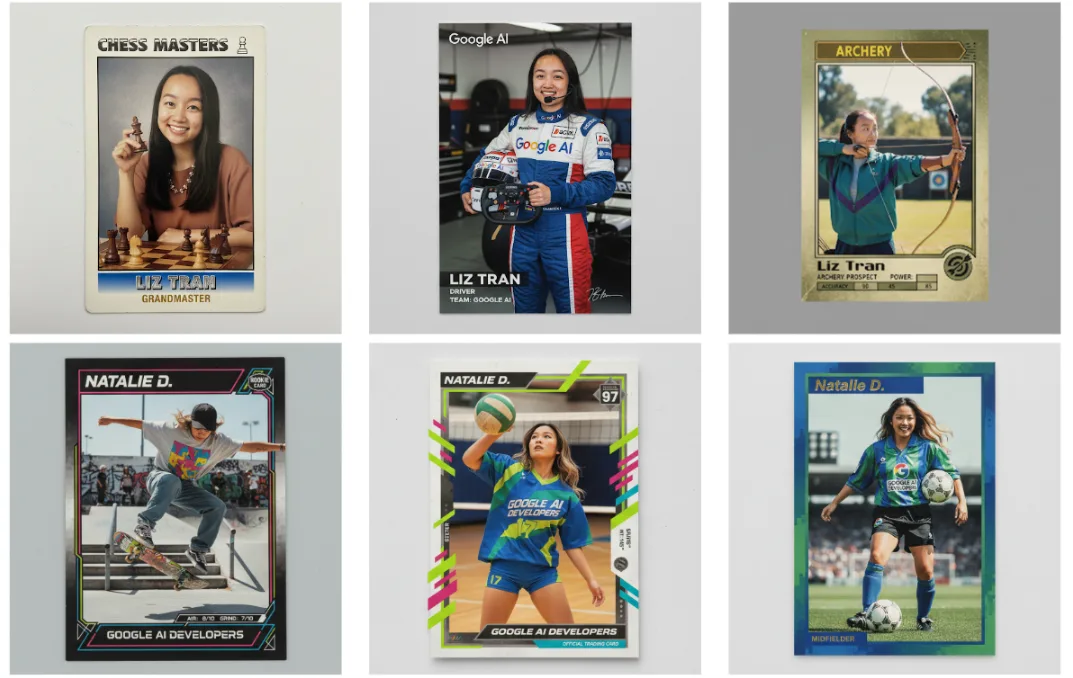
One photo, a whole campaign set
Brands usually need the same product shot three ways: square for the feed, portrait for stories, wide for banners. The Rundown AI's October 12 training session shows a faster route, using Nano Banana 2.1 inside Google Flow to build all three from one clean product photo, with the same product, light, and style carried across every version.
Matching sets are where AI image tools usually fall apart. A model can make one beautiful product shot, then quietly redesign the product when you ask for another angle. This guide is built around preventing that drift: references stay open, changes stay small, and every output gets compared back to the original.
The workflow starts with discipline. Open Google Flow, choose Nano Banana 2.1 in the standard image controls, and add a clear product photo. Check the usage cost before generating, then make one square image with a simple background and room for text. Before approving anything, compare the product against your original photo, because the whole set inherits whatever the first image gets wrong.
Change one thing at a time
The middle of the workflow is restraint. Small, single changes keep the product honest while the layouts multiply:
- Generate one square image with a simple background and space for a headline, then compare it closely with the original photo
- Change one small detail, such as a cloth's color, and confirm the product and the rest of the image stayed put
- Use the original photo and the approved image as references for the portrait and wide versions, changing only the layout
- Add a short headline and check every word before downloading
- Open the finished files and review product details, crop, and text one last time before using them
Where this fits in a real client workflow
The guide's pro tip is the one professionals forget: keep a text free copy of every image. When you need exact brand fonts and logos, add them in your usual design tool instead of asking the model to spell.
For a small brand, the economics are the headline. One afternoon with one good photo can fill a launch calendar that used to need a studio day, a stylist, and a week of retouching. The brands that win with this will not be the ones generating the most images. They will be the ones with the strictest approval step.
This is the same math behind the AI ad work we sell. A product photo that used to anchor a single post can now anchor a week of placements, which is why AI UGC ads and brand spots have become practical for small businesses instead of only for big campaigns. The tool does the layout labor. The human still does the judgment: approving the product's details, protecting the brand's look, and catching the one wrong letter AI loves to hide in a headline.
Sources and further reading
Sources were checked for this article. Tool features, prices and availability can change. Product claims are attributed to their publishers.